


If you have ever walked off the course feeling like your swing disappeared somewhere around the 7th hole, you know the usual routine. You search for tips, try three different swing thoughts, and hope one of them magically fixes your strike.
The problem is not usually effort. It is usually feedback.
That is where an AI golf app can change the way you practice. Instead of guessing what went wrong, you get a diagnosis, a drill to fix it, and immediate feedback while you hit balls. That combination is what makes practice productive rather than frustrating.
This article breaks down how the Swing Coach AI golf app works, why it can help you improve faster, and how one golfer used it to clean up a common strike issue in real time.
Table of Contents
- Step 1: Understand why most golf practice fails without an AI golf app
- Step 2: Know what the Swing Coach AI golf app is designed to do
- Step 3: Set up the AI golf app so it can read your swing
- Step 4: Learn what the AI golf app actually measures
- Step 5: Use the AI golf app diagnosis to pick the right drill
- Step 6: Rehearse the drill before you jump into full swings
- Step 7: Use the AI golf app feedback after every swing
- Step 8: Understand the scoring system so you can track progress
- Step 9: Embrace exaggeration when the AI golf app says you are only just in range
- Step 10: Focus on progress, not perfection, with your AI golf app
- Step 11: Apply the bigger lesson from this AI golf app session
- Step 12: Build a smarter practice routine with an AI golf app
- FAQ
Step 1: Understand why most golf practice fails without an AI golf app
Plenty of golfers put in the time. They hit bucket after bucket, try to make better swings, and genuinely want to improve. Yet the same faults keep showing up.
Why? Because improvement usually depends on three things happening together:
- A correct diagnosis of what is actually causing the bad shot
- A drill or feel that helps you move toward a better motion
- Ongoing feedback so you know whether you are doing the drill correctly
Miss one of those and practice can become random. You might feel as if you are fixing an over the top move, stopping a sway, or getting more shaft lean, but what you feel and what you are actually doing are often miles apart.
That gap between feel and real is one of the biggest barriers in golf improvement. It is also the reason so many lessons feel great in the moment, only for the old pattern to return later on the range or the course.
An AI golf app aims to close that gap by giving you instant information after every swing.
Step 2: Know what the Swing Coach AI golf app is designed to do
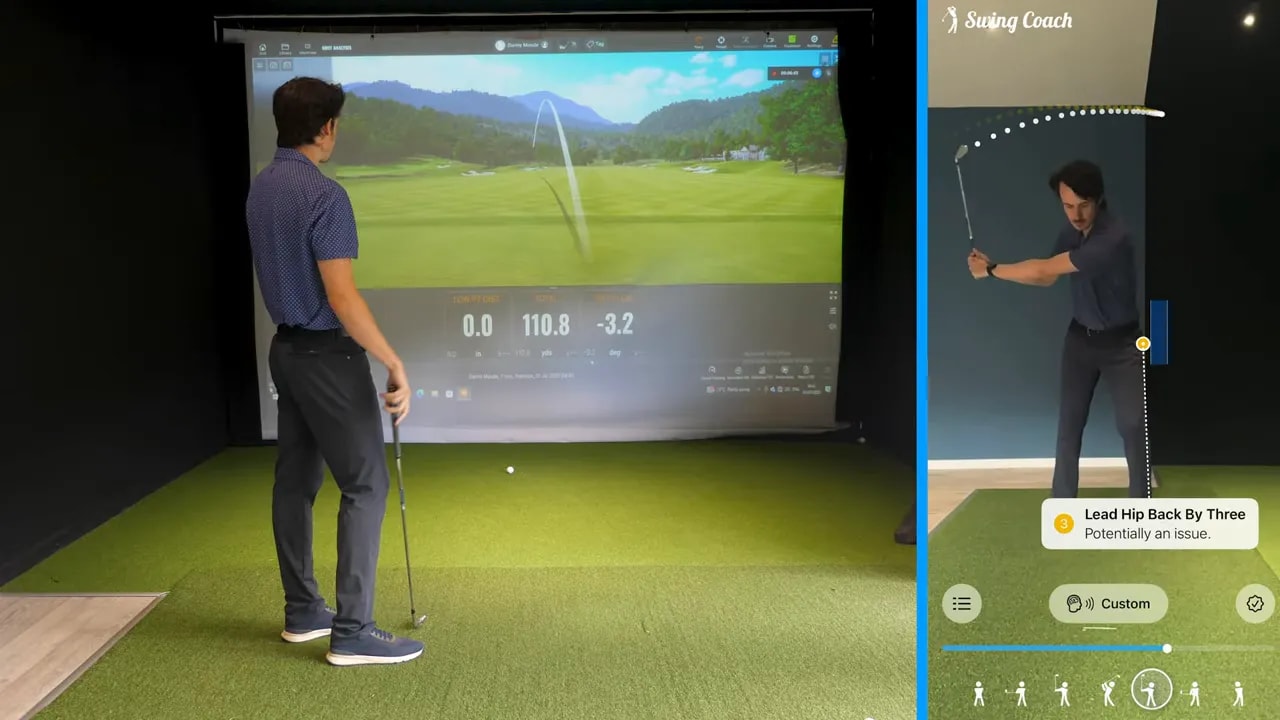
Swing Coach is presented as an AI golf swing analyser that sits in your pocket. You set your phone up on a tripod, make swings, and the app gives you spoken feedback after each shot.
Its purpose is simple. It is meant to replicate the three most useful parts of coaching:
- Spot the pattern that is causing poor contact or poor direction
- Give you a drill that matches that pattern
- Tell you after every swing whether you are getting closer to the target motion
That matters because many golfers can improve during a lesson when someone is standing there guiding every swing. The challenge comes after the lesson ends. Without feedback, it is easy to drift right back into the same move.
This AI golf app is built to keep that feedback loop alive while you practice on your own.
Step 3: Set up the AI golf app so it can read your swing
The setup is intended to be quick and simple. You place your phone on a tripod, position it so the camera can see your motion clearly, and start hitting balls.
The key idea is convenience. You do not need to handle your phone after every shot. The app analyses the swing and responds automatically, which keeps you in a practice flow instead of turning the session into a filming project.
That ease of use is important for any AI golf app. If setup is fussy or slow, most golfers will stop using it. Here, the goal is to make swing analysis feel like part of your normal range session.
Once you are framed correctly, the app can measure specific positions in the swing and compare them to its target ranges.
Step 4: Learn what the AI golf app actually measures
In the example session, the app identifies two key pieces of motion:
- Lead hip position at half down
- Shaft lean at impact
Those measurements become the basis for the diagnosis.
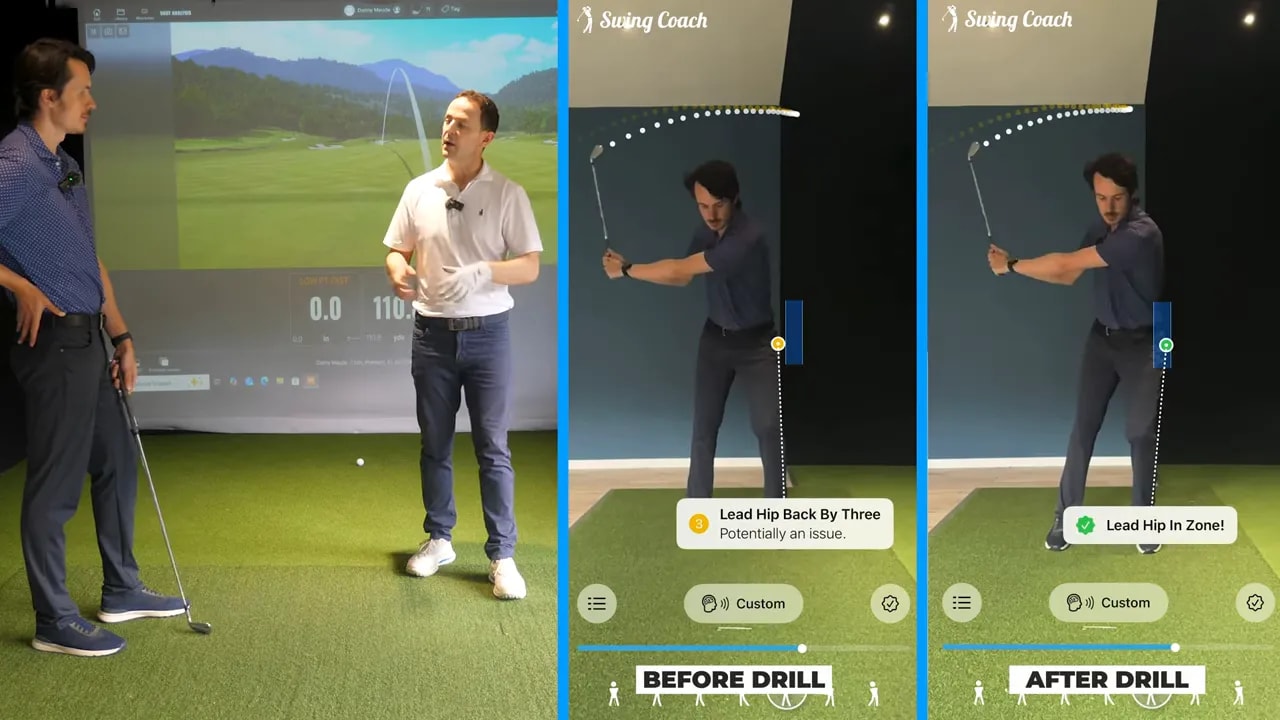
For the golfer in the session, the app reported:
- Lead hip back at half down
- Shaft lean back at impact
That combination explained the inconsistent strike pattern. When your lead hip stays too far back and the shaft leans backward through impact, you are far more likely to catch the ground behind the ball, thin it, or lose compression.
This is where an AI golf app becomes useful. It does not just tell you the shot was bad. It gives you a likely reason.
Step 5: Use the AI golf app diagnosis to pick the right drill
A diagnosis alone is not enough. Once you know the issue, you need a movement pattern that helps you change it.
In this session, the chosen drill used a simple and very golfer friendly image: hammering a nail into a wall.
The golfer was asked to imagine the club like a hammer and the strike point like a nail set just forward of where the ball sits. The idea was to train a more forward, more compressive delivery through impact rather than letting the body and shaft fall backward.
The drill was built in stages:
- Start with the wrists only and feel the hammer motion
- Add the trail elbow folding and moving through
- Add the trail shoulder moving around to support the strike
This creates a clearer sense of how the club should move through impact. If you move backward, roll too much, or hang off your trail side, you would miss the nail or strike it poorly. That image makes the correction easier to understand than a list of technical instructions.
A good AI golf app does more than measure. It helps turn a fault into a feel you can actually use.
Step 6: Rehearse the drill before you jump into full swings
One of the smartest parts of the process is that the golfer does not go straight from diagnosis into full speed shots. Instead, he rehearses the motion first.
That matters because most swing changes need exaggeration at first. If your old pattern has been with you for a while, your first attempt at change will often still be too close to the original move.
During rehearsals, the app starts confirming whether the new motion is moving in the right direction. In the early swings, the feedback improved quickly:
- Lead hip moved into the zone
- Shaft lean improved from backward to nearly neutral, then forward
This is a huge boost for practice confidence. You are no longer wondering whether the new feel is nonsense. You have evidence that it is shifting the numbers.
Step 7: Use the AI golf app feedback after every swing
The standout feature here is the immediate feedback. After each swing, the app reports where the golfer stands relative to the desired movement pattern.
Examples from the session included messages like:
- Lead hip in zone
- Shaft lean back by one or two
- Shaft lean forward by three
That running commentary changes the quality of practice. Instead of judging every shot only by ball flight, you can judge it by whether the movement was better.
That distinction is important in golf. Sometimes you make a better swing and still hit a poor shot because the change is new. If you rely only on the result, you may abandon the correct fix too early. If your AI golf app confirms that the motion improved, you can stay patient and keep building the pattern.
This is how you start connecting feel and real. The app tells you what happened, and over time you learn what the correct move actually feels like in your own swing.
Step 8: Understand the scoring system so you can track progress
Swing Coach also uses a rating system from 1 to 10.
The basic idea is straightforward:
- 1 means you are close to the target zone
- 10 means you are a long way from the pattern typically seen in solid golfers
The zone is described as a kind of safe area where most golfers are more likely to produce a reliable strike and accurate shots.
This matters because improvement is rarely instant. You are not trying to become perfect in three swings. You are trying to move from clearly off pattern toward functional and repeatable.
For many golfers, that is a much healthier way to practice. You stop chasing miracle shots and start building better numbers one swing at a time.
Step 9: Embrace exaggeration when the AI golf app says you are only just in range
Another useful coaching point from the session is that being barely in the zone during a rehearsal may not be enough.
Why? Because when you step into a real swing, old habits tend to creep back in.
That is why the golfer was encouraged to exaggerate the new movement even more in practice. If the app said the lead hip was forward by two and shaft lean forward by three during rehearsal, that was considered a positive sign. It meant there was enough exaggeration to survive the jump into a real shot.
This is one of the best applications of an AI golf app. It gives you permission to overdo the feel when needed, because you can see whether the exaggeration is productive rather than harmful.
Step 10: Focus on progress, not perfection, with your AI golf app
In the real practice example, the golfer did not transform overnight. But he did start getting closer almost immediately.
That is the point.
Better golf usually comes from stacking small wins:
- A clearer diagnosis
- A drill that actually matches the issue
- Feedback that keeps you from drifting away from the fix
With those pieces in place, your practice becomes more honest and more efficient. You spend less time guessing and more time building a reliable strike.
If you tend to leave the range with more questions than answers, an AI golf app may be the missing link. It gives you a way to coach yourself with structure rather than trial and error.
Step 11: Apply the bigger lesson from this AI golf app session
The technology is interesting, but the deeper lesson is even more useful.
Golf improvement is not about collecting endless tips. It is about creating a feedback loop.
When you know:
- what is wrong,
- what to do about it,
- and whether you are doing it correctly,
you give yourself a real chance to improve.
That is why a tool like this can be so effective for everyday golfers. It makes solo practice feel more like guided coaching. And if you are the sort of player who often wonders whether your swing thought is helping or hurting, that kind of clarity is invaluable.
Step 12: Build a smarter practice routine with an AI golf app
If you want to use this style of training well, keep your routine simple:
- Start with a clear swing issue such as poor contact, thin strikes, or slices
- Use the AI golf app to identify the movement pattern behind it
- Choose the recommended drill
- Make slow rehearsals first
- Listen to the feedback after every swing
- Exaggerate when needed to shift the numbers
- Judge success by movement quality, not just ball flight
That kind of structure can turn a messy range session into a meaningful one. And for golfers who love improving but hate wasting time, that is a pretty compelling combination.
FAQ
What is the main benefit of using an AI golf app?
The biggest benefit is instant feedback. An AI golf app can diagnose a swing issue, suggest a drill, and tell you after each swing whether you are moving closer to a better pattern.
Can an AI golf app really help with inconsistent ball striking?
Yes, especially when the inconsistency comes from a repeatable movement fault. In the example covered here, the app identified lead hip position and shaft lean issues that were contributing to poor contact.
Why is feel versus real so important in golf?
Because what you think you are doing in the swing is often different from what is actually happening. Feedback helps you match your feel to the motion you are truly making.
Should you go straight into full swings after getting a diagnosis?
No. It is usually better to rehearse the drill first, build the correct feel, and then move into fuller swings once the app confirms you are trending in the right direction.
What does it mean when the AI golf app says you are in the zone?
It means your measured swing positions are close to the app’s target range for producing a more solid and reliable strike.
Is an AI golf app meant to replace golf lessons?
It is better viewed as a way to extend coaching into your practice sessions. It can help you maintain changes between lessons by giving you ongoing feedback when you are working on your own.
If your practice sessions often feel like guesswork, the real takeaway is simple. You improve faster when you stop searching blindly and start working with clear feedback. That is exactly where an AI golf app can earn its place in your golf bag.
0 Comments